A simple, robust solution you can run yourself

The power of people, assembled to respond.

Everyone answers in one place, and the right people see what matters.

No IT department. No procurement. Sign up, drop in your resident list, and start communicating effectively in a crisis.

How it works

One report is a hunch. Three is a signal.

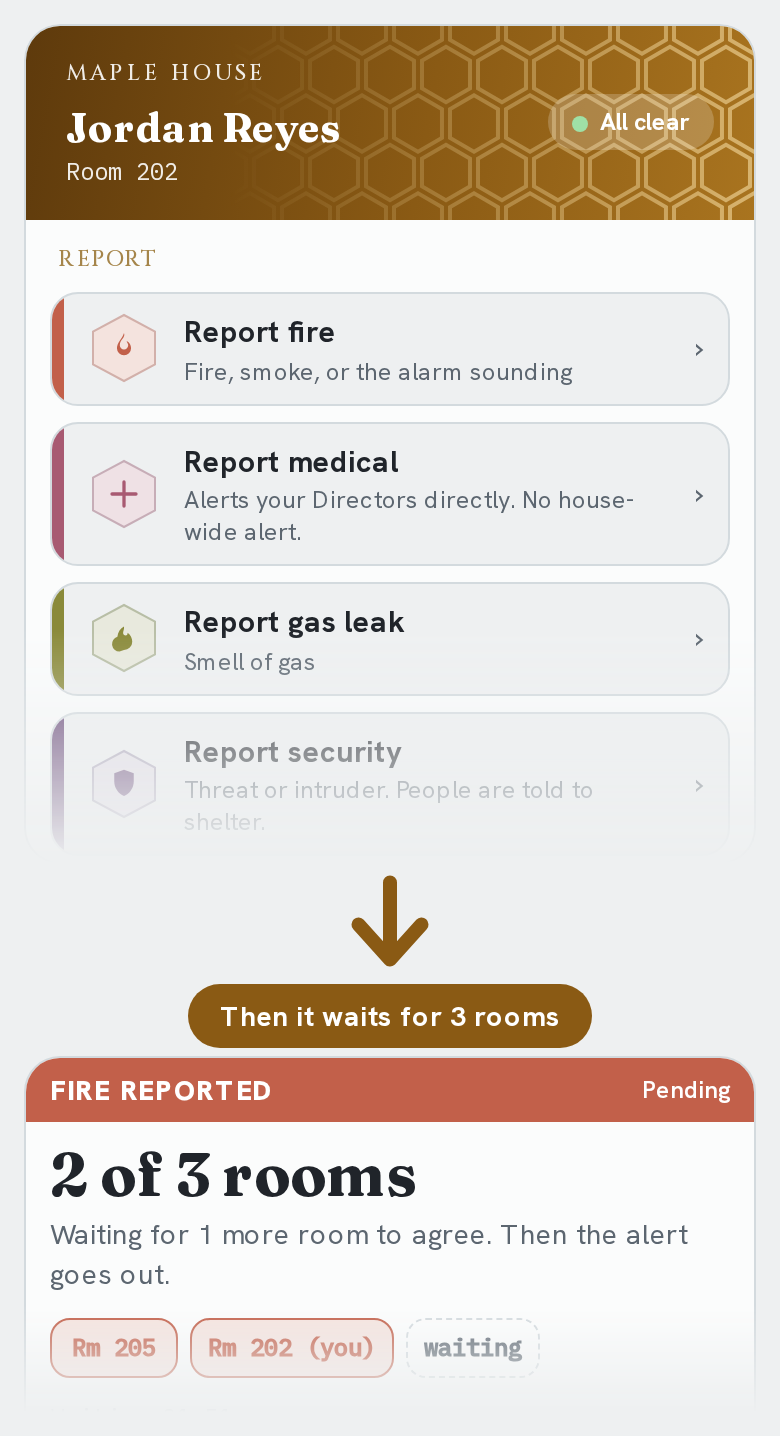
Tap Report fire, then the card shows 2 of 3 rooms have reported and the alert goes out at 3

01

Reporters hit quorum

  • Anyone taps or texts what's wrong
  • One report waits for company
  • Three rooms agree, alert goes out
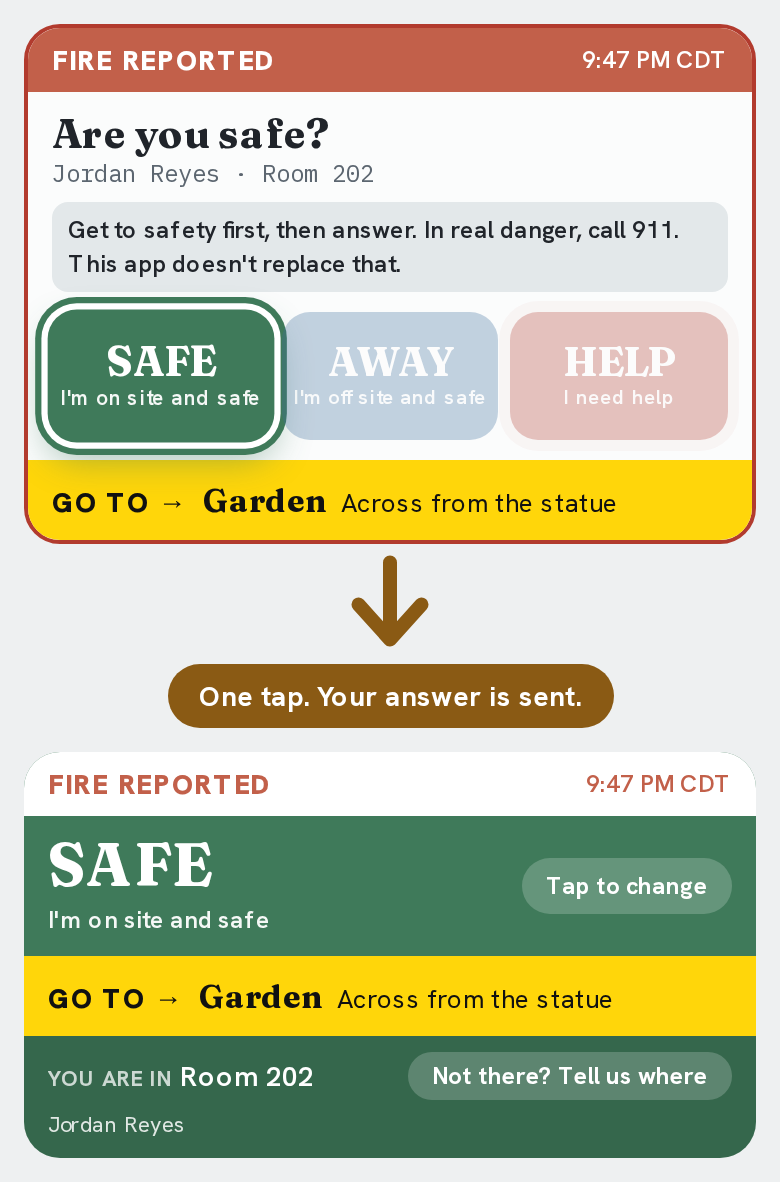
The resident taps SAFE and the card turns green, showing where to go

02

The building is alerted and told where to go

  • Everyone is asked: are you safe?
  • One tap answers, easy to change
  • Everyone sees where to go
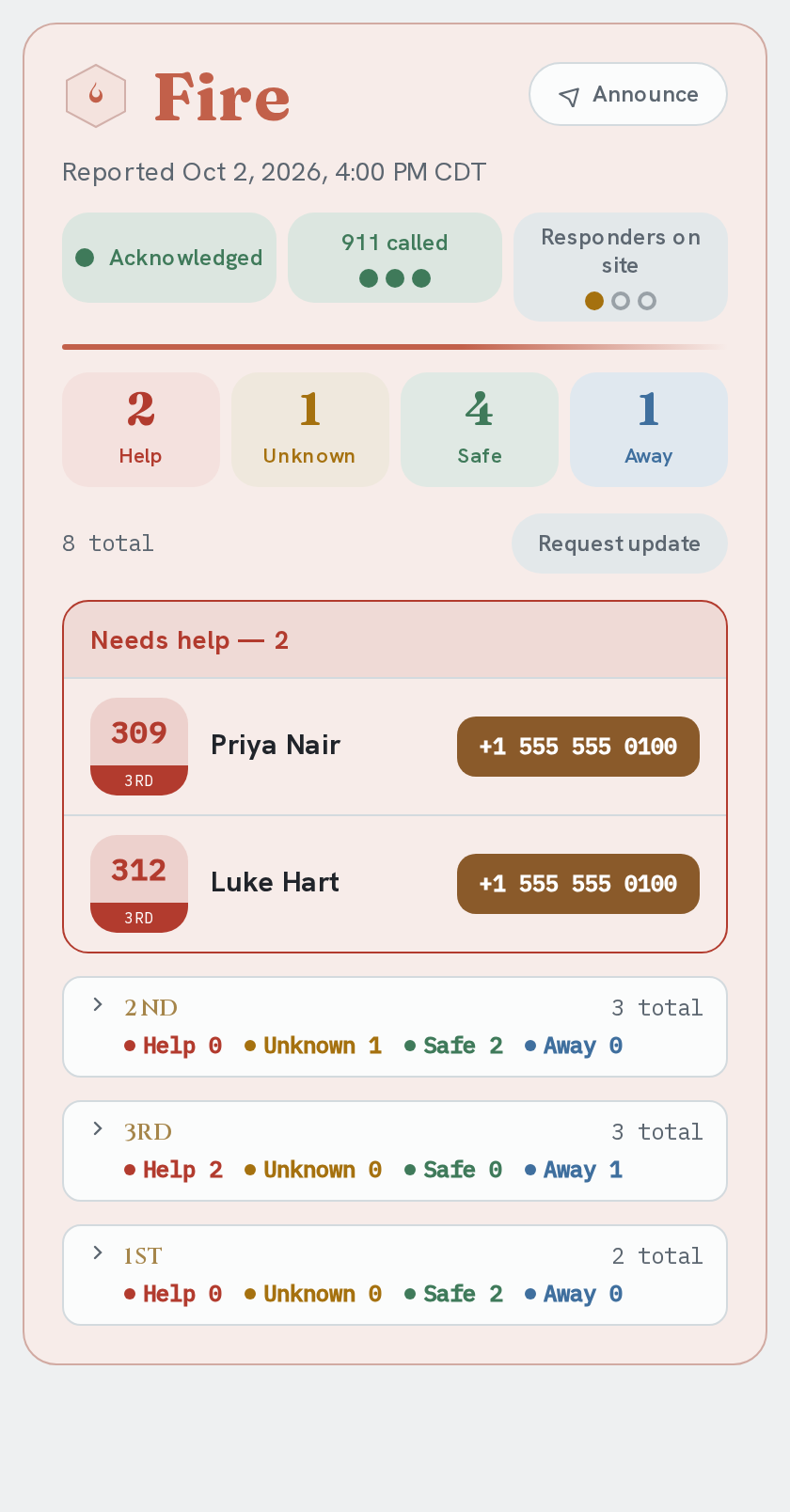
The live incident status in one view: who is safe, who needs help, and where, with 911 and responders

03

Everyone follows the same live status

  • Everyone sees a live headcount
  • Status lights for 911 and responders
  • Anyone can share a clean summary

Also built in

Medical goes to managers only

No waiting. No building-wide alert.

Shelter in place when needed

Stay put and secure. Don't gather.

Drills clearly marked TEST

Never mistaken for the real thing.

Start in an afternoon

Sign up. Add your list. Start communicating.

No IT. No procurement. No big process.

We meet you where you are

  • Bring the list you already have
  • Drop it in and we find names, rooms and numbers
  • Everyone is set up with nothing to retype

Nothing for residents to set up

  • No account and no app download
  • A text link, plus an optional free web app

Words that fit your community

Pick yours. Quorasen uses your words everywhere.

One account, shared with managers

  • Add other managers anytime
  • Hand it over when the board changes

Running more than one building? or add a building from your account.

Start with one building. Grow when you are ready.

Add more buildings on the same login, each managed and alerted separately. Choose an Organization to see them all together.

Buildings

Red BuildingABM UofIAlert hereABM WSU

Add buildings as you grow.

  • Stay separateEach building keeps its own floors, rooms, members and alerts
  • Jump between buildingsOpen any of your buildings from one menu
  • Add as you goThe same price for each building, and you can add one whenever you like

An Organization

Alert hereABM UofIDrill doneManager AABM WSUActive alertManager BRed BuildingDrill past dueManager A1 active alert ยท 1 drill due

See them all together.

  • Command CenterAll your buildings' alerts, drills, and readiness on one screen
  • Set drill goalsChoose how often each drill should be run. Managers receive reminders; Command Center alerts when missed.
  • Assign ManagersBuilding by building. Add as many as you need, and one person can run several
  • One bill, lower pricesOne bill for all your buildings, and the more you add, the less each one costs

How it grows

  1. 1Start with one building. Nothing to set up.
  2. 2Add more on the same login. Each keeps its own members and alerts.
  3. 3Upgrade to an Organization from your account when you want the Command Center.

Call them whatever fits: house, chapter, facility. Add as many buildings as you need.

Why "Quorasen"

Named for how bees decide without a leader.

Nobody's in charge. The people agreeing with each other is the decision.

Honeybee scouts check out nest sites on their own. When enough of them converge on the same one, the whole colony commits. Biologists call it quorum sensing. Your building works the same way.

Get Quorasen for your building